

Kodi + IPTV Simple Client
A free media centre with an official add-on for M3U channels and XMLTV programme data inside Kodi.
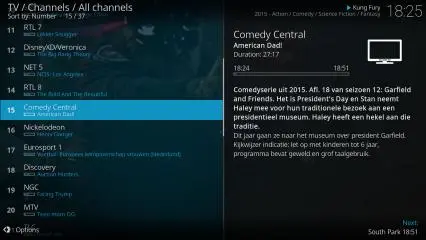
Why we recommend it
A useful Linux and desktop alternative if you want a TV interface and guide and are comfortable configuring an add-on.
Features
- Live channels inside Kodi
- XMLTV programme guide
- Local and remote M3U lists
Devices and versions
Kodi supports Windows, macOS, Linux and Android; choose the stable build matching your device. Linux may need a distribution PVR package rather than an in-app install. The add-on must match the Kodi release.
Device families6
Payment model
Kodi and IPTV Simple Client are free and open source, without included viewing content or subscription.
Keep in mind
- Requires installing and configuring an add-on.
- This recommendation covers the official add-on only, not unknown add-on bundles.
- Direct Xtream login is not documented for this setup path.
Installation and setup
- 1
Install stable Kodi from its official site or your distribution repository.
- 2
Open Settings, Add-ons, Install from repository, PVR clients and install IPTV Simple Client; follow the Linux instructions where needed.
- 3
Open Configure, enter the supplied M3U and XMLTV sources, enable the add-on and open TV.
Adding your source
M3U URL/file for channels and XMLTV URL for the guide.
Enter your own details and hide passwords and account codes in screenshots sent to support.
Downloads and stores
Downloading does not purchase an app licence or service subscription. Store options can vary by country and device.
Related guides and fixes
- There is no guarantee.
- Check the network, device and source, and use the viewing guides in our help centre.
Chosen your player? Explore our services
We also offer Neo and MH Pro subscriptions. Try the service on your device and confirm the connection method with support before buying.
Neo 4K Pro
Neo 4K Pro offers terms from one month to a year to fit your plans. Try it on your device and confirm the content and viewing quality before choosing a package.
MH Pro
MH Pro has its own audience and value, with terms from 3 months to two years. Choose according to your experience of its content and performance on your device, and your planned period of use.
The service trial is free for 24 hours, once only, and separate from the player licence.
Alternatives for the same devices

Rodixa Play
Trial, then paidAn Arabic-ready, remote-friendly home for your playlists, channels, films and series on Android and Fire TV.
Device families4
- M3U and Xtream playlists
- Source-dependent EPG guide
Direct APK; the app trial is separate from the service trial.
Why we recommend it
Ghazaly’s first choice for supported devices, with native Arabic, profiles and organised favourites.

TiviMate
Free with paid featuresA remote-friendly player with channel lists and a clear programme guide for large screens.
Device families3
- EPG programme guide
- Multiple playlists and favourites
Built for TV remotes, not touch phones or tablets.
Why we recommend it
Choose it to organise live channels, favourites and the guide on Android TV.

IPTVX
Free with paid featuresOrganises playlists into a visual library of live TV, films and series with a programme guide.
Device families7
- A library for films, series and channels
- Favourites and programme guide
Versions and purchases differ between Apple and Android; check your OS.
Why we recommend it
A useful choice for recent Apple devices and people who prefer a structured library and synchronised data.
Player, licence and service: what is the difference?
Player fees are separate from the service subscription. Our subscription runs on one device at a time, even if the app offers multiple screens. App trials are separate from our one-time 24-hour service trial. Features and performance depend on your device, network and content source.