

MAG — Embedded Portal
Guidance for the built-in portal on Linux/WebKit MAG boxes, rather than a separate player download.

Why we recommend it
Use this route when your provider supplies a portal compatible with your exact MAG model.
Features
- Built-in portal workflow
- Provider portal URL input
- Model and firmware-specific settings
Devices and versions
For Linux/WebKit MAG models with Servers and Portals menus. It does not cover Android-based Infomir devices or locked customised firmware. Model, firmware and the provider's permitted-device list matter.
MAG · built-in portal1
Payment model
The embedded portal is part of the box firmware; this route needs no separate player purchase. The box and viewing service have separate costs.
Keep in mind
- Custom firmware can hide settings and a provider can reject a model.
- Do not change firmware or factory-reset before speaking to support; saved settings can be lost.
Installation and setup
- 1
Send support the model and firmware version to confirm portal compatibility.
- 2
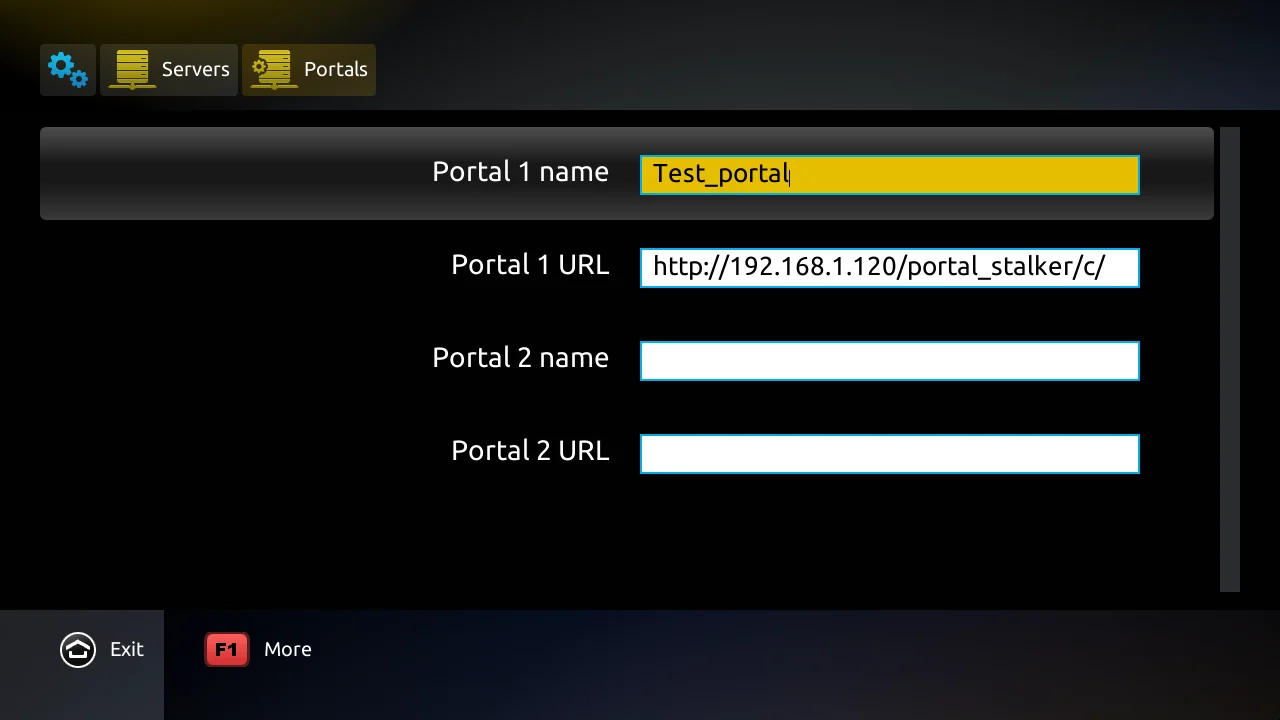
If available, open Settings, System Settings, Servers and Portals.
- 3
Enter the supplied portal name and URL, save and reload the portal according to your model's instructions.
Adding your source
The provider's portal URL; device registration may be required. This is not a generic M3U-import method.
Enter your own details and hide passwords and account codes in screenshots sent to support.
Images from the official setup guide
Developer guide
Downloading does not purchase an app licence or service subscription. Store options can vary by country and device.
Related guides and fixes
- There is no guarantee.
- Check the network, device and source, and use the viewing guides in our help centre.
Chosen your player? Explore our services
We also offer Neo and MH Pro subscriptions. Try the service on your device and confirm the connection method with support before buying.
Neo 4K Pro
Neo 4K Pro offers terms from one month to a year to fit your plans. Try it on your device and confirm the content and viewing quality before choosing a package.
MH Pro
MH Pro has its own audience and value, with terms from 3 months to two years. Choose according to your experience of its content and performance on your device, and your planned period of use.
The service trial is free for 24 hours, once only, and separate from the player licence.
Player, licence and service: what is the difference?
Player fees are separate from the service subscription. Our subscription runs on one device at a time, even if the app offers multiple screens. App trials are separate from our one-time 24-hour service trial. Features and performance depend on your device, network and content source.